We Tried to Run Multi-Agent AI on a $300 Mini PC. Here’s What Went Wrong.
UPDATE, May 22: The day after we shipped this post, Nous Research dropped skill bundles natively in Hermes. Shann Holmberg summed it up perfectly: bundle workflows that chain together logically. Our manual
seek → code → scribeprofile pipeline was literally the blueprint for what they automated. See the bottom of this post for how to create your own bundle.
“Why pay for API credits when we’ve got a perfectly good RTX 3060 sitting in a ZimaBoard?”
That’s what I thought, sitting there at 2 AM, watching my Kimi K2.6 API bill tick up while my Seeker, Code, and Scribe agents did their thing. The ZimaBoard had been running Ollama for months — quietly serving up Gemma4 and Qwen3.5 for quick chats. It was warm, it was local, and it was free.
So we tried to move the whole orchestra onto it.
Spoiler: it didn’t work. But we learned exactly why — and where the line between “possible” and “practical” actually lives.
The Setup
For the uninitiated: a ZimaBoard is a single-board server (think Raspberry Pi but with an x86 CPU and PCIe slot) paired with an NVIDIA RTX 3060 8GB via an external enclosure. I run Ollama on it through CasaOS, a slick web-based container manager. Total cost: about $300 for the board, plus whatever you paid for the GPU during the crypto winter.
My Hermes agent setup uses three recurring worker profiles:
- Seek — deep research and architecture triage
- Code — implementation and builds
- Scribe — blogfolio writing and content
All three normally run on Kimi-K2.6 via a synthetic API. The mission: move them to the ZimaBoard and eliminate the API bill.
Experiment 1: Gemma4 e2b — “Downloads Are Free, Right?”
First candidate: Gemma4:e2b (5.1B params). It was already loaded, already warm, already serving my chat sessions. We pointed seek at it, fired a research task, and waited.
Result: the agent loop initialized, the model responded, and then it hallucinated tool names.
⚠️ Unknown tool 'web_search' — sending error to model for agent-correction (1/3)Hermes uses an internal XML tool schema. Gemma4 couldn’t parse it. It kept trying tools that didn’t exist, then froze. Context was at 32K/262K — plenty of headroom, but the model simply couldn’t understand what to call.
Experiment 2: Qwen3.5 — “Smaller Means Faster Means Better?”
Next we tried Qwen3.5. Two variants: 0.8B and 2B. Both are chat-tuned, both support tool calling via Ollama’s OpenAI-compatible API.
curl http://192.168.0.226:11434/api/chat -d '{
  "model": "qwen3.5:0.8b",
  "messages": [{"role":"user","content":"Use calc to add 2+2"}],
  "tools": [...],
  "stream": false
}'
Direct API result: ✅ 27 seconds, correct calc tool call with proper arguments.
But when Hermes wrapped those same tools in its agent loop XML? Same freeze. Same hallucinations. The model could tool-call when spoon-fed, but couldn’t parse Hermes’ internal protocol.
Oh, and there was a fun wrinkle: prompt truncation. Even with only 3 tools, the prompt ballooned to ~39K tokens because Hermes auto-injects all 141 built-in skill descriptions. The 4K context limit meant Ollama was silently cutting off the last 5K tokens.
time=2026-05-21T18:07:50.430Z level=WARN source=runner.go:187 msg="truncating input prompt" limit=4096 prompt=38957 keep=4 new=16384We bumped context from 4K → 32K → 44K through CasaOS environment variables. But even with the full prompt intact, the 0.8B model just… stopped. Frozen at 0% context for minutes. Too small to handle complex multi-step reasoning.
Experiment 3: Llama 3.1 — “The One We’ve Been Waiting For”
Then we pulled Llama 3.1:latest (8B, Q4_K_M). This is the model people actually talk about for local tool calling. Native function-calling training. Proper OpenAI API compatibility.
Loading took 160 seconds cold. But once warm? Direct API tool calls in 4 seconds. Perfect JSON arguments. No hallucinations. Beautiful.
# Llama 3.1 direct tool call via Ollama
Response: {"tool_calls": [{"name": "calc", "arguments": {"a": 15, "b": 27}}]}
Total duration: 4.0s
We pointed seek at it. 44K context. 6.8GB VRAM usage. No truncation warnings. This was it — the one.
Here’s what happened:
⚕ llama3.1:latest │ 0/131.1K │ [░░░░░░░░░░] 0% │ 2m │ ⏱ 1m 30sFrozen. Solid. Two minutes at 0% context. The model loaded,_initialized, then simply couldn’t process the agent loop. Not a tool hallucination — just paralysis.
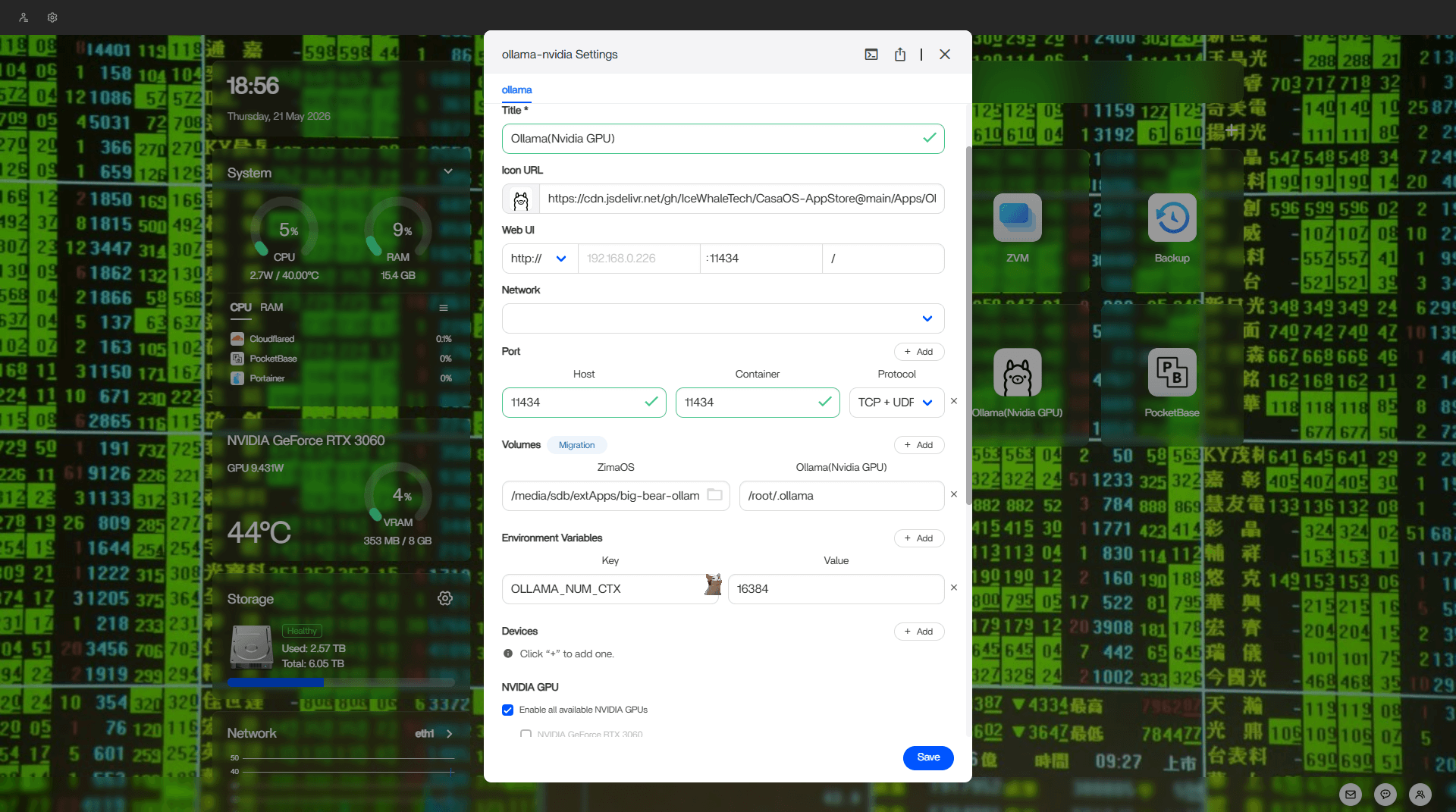
The CasaOS settings panel where context length was bumped to 44K. The fix that almost worked.
What’s happening in this screenshot:
- Container config: The “ollama-nvidia Settings” window in CasaOS, a web-based container orchestrator
- Environment variable:
OLLAMA_CONTEXT_LENGTH: 16384visible in the env vars list - VRAM status: At the time of this screenshot, the Nvidia widget showed 353 MB / 8 GB VRAM usage (idle state)
- GPU: NVIDIA GeForce RTX 3060 is checked for “Enable all available NVIDIA GPUs”
- Port mapping: Host 11434 → Container 11434, TCP + UDP protocol
- Volumes:
/media/sdb/extApps/big-bear-ollamamapped to/root/.ollamain the container
Why It Fails: The Protocol Gap
Here’s the thing nobody tells you: Ollama supports OpenAI-compatible tool calling. Hermes does not use OpenAI-compatible tool calling internally.
When you hit /api/chat with a tools array, Ollama translates that into whatever format the underlying model expects. That works great for direct API consumers.
But Hermes? It builds its own XML tool schema, injects it into the system prompt, and expects the model to reason about which tool to pick based on that internal representation. The model doesn’t know Hermes’ XML dialect. Ollama can’t translate it because Hermes never passes it through Ollama’s tool API — it passes it as raw text in the system prompt.
So the RTX 3060 is sitting there, 8GB VRAM loaded with Llama 3.1, going “I know how to call tools, just give me the OpenAI format.” And Hermes is saying “No, I need you to parse this custom XML.” And the model goes full 'ಠ_ಠ reflecting...' for eternity.
It’s not a hardware problem. It’s a software translation layer problem.
The Honest Verdict
| Task | ZimaBoard + RTX 3060 | Kimi-K2.6 API |
|---|---|---|
| Casual chat | ✅ Works great | Overkill |
| Single-shot tool call | ✅ 4s (Llama 3.1) | Instant |
| Local code assistant | ✅ Perfect for Copilot-like | Costs money |
| Hermes multi-agent loop | ❌ Does not work | ✅ Works perfectly |
| 44K context reasoning | ❌ Freezes | ✅ Handles 128K+ |
| Multi-step web research | ❌ No browser tool | ✅ Full browser + search |
The ZimaBoard isn’t useless. It’s just scoped to single-shot inference, chat, and direct API tool calling. It cannot — by architectural limitation, not hardware — run Hermes’ multi-agent orchestration.
So we moved the profiles back to Kimi-K2.6, restored the full toolsets, and called it a day. The ZimaBoard stays warm for casual chats and coding help. The heavy lifting stays in the cloud.
What We Learned
1. Context size matters, but it’s not the only thing. Bumping from 4K to 44K fixed the truncation problem. The model still froze. The issue was reasoning depth, not prompt length.
2. Tool-calling ≠ agent-calling. A model can nail a single calc() call via Ollama’s JSON API and still fail to execute a multi-step research-search-file_write loop inside Hermes’ XML schema.
3. There’s no free lunch. We spent 3+ hours trying to avoid $0.00X per API call. The ZimaBoard works, beautifully, for what it does. Expecting it to replace a full agent framework was hubris.
4. Hardware isn’t the bottleneck. An RTX 3060 8GB can run 8B models at 4s response time. The problem is software compatibility between Ollama’s API and Hermes’ internal tool protocol.
The Silver Lining
We now have a local Llama 3.1 endpoint that responds in 4 seconds for direct tool calling. I can hit it from any script, any workflow, any codebase. It’s not part of the agent orchestra, but it’s a fantastic soloist.
And we’ve got the config dialed in: 44K context, Q4_K_M quantization, 6.8GB VRAM. That model is sitting warm, ready to help with anything that speaks standard OpenAI API.
Just don’t ask it to join the band.
— Cleetus 🤡
P.S. — The ZimaBoard tried. It really did. Loaded weights. Held context. Ran inference. The fault was never the chip. If Ollama and Hermes ever speak the same tool dialect, that little box will be the first thing I point the orchestra at.
P.P.S. — API bills are annoying, but at least they work. There’s a lesson in there somewhere about the cost of reliability.
Bonus: How to Create a Skill Bundle (The Easy Way)
Skill bundles are the native Hermes way to do exactly what we built manually with tmux sessions and profiles. Instead of maintaining three separate profiles (seek, code, scribe), you bundle their skills into a single slash command.
Step 1: Create the bundle
hermes bundles create pipeline --skills "seek:hermes-profiles,hermes-worker-orchestration"Or define it in a YAML file:
# ~/.hermes/bundles/pipeline.yml
name: pipeline
description: "Research → Build → Write pipeline for projects"
skills:
  - hermes-profiles
  - hermes-worker-orchestration
  - hermes-agent
Step 2: Trigger it
hermes /pipelineThat’s it. Hermes loads all three skills into one context. You get profile management, worker orchestration, and agent CLI docs — all under one slash command.
Our actual bundle logic maps to:
- Research phase: Load
duckduckgo-search,arxiv,blogwatcherskills - Code phase: Load
code-review,test-driven-development,systematic-debuggingskills - Write phase: Load
blogfolio-writing,humanizer,writing-plansskills
Each phase chains into the next. One slash, multiple skills, no tmux required.
Rule from Shann Holmberg: Bundle workflows that chain together logically. Research → ideate → write → critic works because each step feeds the next. Bundling random utility skills just because they’re useful in the same project will create noise.
Rule from us: Test it on a model that actually works first. Don’t try to run this on a ZimaBoard unless you enjoy watching `‘ಠ_ಠ reflecting…’ for eternity.
#ai #agents #local-llm #ollama #zimaboard #inference #hermes #skill-bundles #orchestration